Category: Technology

What can Shel Silverstein’s “Writer Waiting” teach us about writing?

Haley Petcher, Consultant 

I first read Shel Silverstein’s poetry when I was in elementary school. I loved his doodles, and I loved his rhymes. When I got older, I loved his cleverness. Silverstein could tell a good story in only a few words and could capture the minds and hearts of children and adults alike while doing so.

Maybe you’ve heard that Silverstein’s writing is childish or not up to par with the poetry greats, like Yeats or Shakespeare, but I’m here to show you that he can actually tell us quite a bit about writing. Let’s start by looking at one of his poems about a writer.

Writer Waiting Silverstein

The poem, paired with a sketch of a young child staring at his computer screen and waiting for something to happen, is very clearly about computers and writing. I don’t know about you, but often when I write, this is a pretty accurate representation of me. Even though I’m in grad school, I feel like a kid who has no idea what she’s doing, and sometimes I stare at the screen, hoping for a miracle.

We could go down many rabbit holes about using or not using “standard English” or about all of the rhetorical choices Silverstein makes in his argument that computers are actually not the key to writing, but this time we’re going to focus on the following:

  • What computers can and can’t do
  • Creative license in syntax
  • What the writing center can help you accomplish

The narrator says that he doesn’t “need no writin’ tutor” because the computer can do it all. It can check spelling by showing you the ominous red squiggly line and grammar by showing you the questioning green squiggly line. Sometimes these lines are useful and alert you of typos or sentence fragments. But other times they’re wrong. And sometimes they don’t catch the mistakes. For example, my computer did not use a green squiggly line for my previous two sentences, even though they are technically fragments. Those sentences are examples of using your “creative license” to make a point by putting more emphasis on the sentence.

Silverstein uses his creative license in most of his poetry. A few examples in his poem are, “It can sort and it can spell,/It can punctuate as well,” which the computer doesn’t mark but is a run-on sentence, and “(Just as soon as it can think of what to write),” which the computer does mark as a fragment. Both of these examples rely on their syntax to create the rhythm of the poem, or how we hear and read it. Try reading it aloud while paying close attention to the syntax. (Remember to use longer pauses for periods than for commas.) If Silverstein paid too much attention to the computer, he wouldn’t have been able to create this rhythm or achieve his meaning.

My favorite part of “Writer Waiting” is my second example of Silverstein’s use of creative license. It is the last line, which is in parentheses as if it’s an afterthought or something the narrator doesn’t want to admit. It reads, “(Just as soon as it can think of what to write).” Two words in this line are key: “it” and “what.” “It” puts an emphasis on the computer, while “what” brings our attention to the content of the paper, though the poem mostly focused on the mechanics, like punctuating and spelling. The computer, of course, cannot create the content for us, even though we want it to. Writing is not just about the tools you use; it is about you and your thoughts.

Writing also does not have to be a solitary act. In fact, I think writing is more fun when you talk to other people about it. Here at the University Writing Center, we can help you decide if the squiggly lines offer the best choice, if you should deviate from the computer’s options, and if it’s the best time and place for you to use your creative license in writing to make your point. Most importantly, we can discuss your ideas for your paper. The writing center is here to help you not look and feel like the kid in Silverstein’s drawing.

5 Tips for Productivity: The Secret to Success

Arielle Ulrich, Consultant

DSCN1639Now that we’re nearly a month into the semester, you’re hopefully starting to get the hang of your classes. You’ve gone to a few classes, you’ve turned in some assignments, and you’ve probably just taken your first exam or written your first paper. This is the point in the semester where I typically lose steam because, after all, the end of the semester seems so far away. It’s not until later in the semester, when I’m struggling to write three papers at the same time, that I realize how much time I wasted at the beginning of the semester and wish I could go back in time and slap myself.

However, instead of starting to work on that time machine, I recommend something a little more practical (and doable): invest some thought into raising your productivity level. As a graduate student, I can’t emphasize enough the importance of utilizing your time in an efficient way. If you’re struggling to get all your school work done, it’s not enough to simply work harder, you also need to work smarter. Hence, I’ve put together some tips that should get you started and hopefully serve you well throughout the semester as you plan for success.

  1. Be honest with how you’re spending your time. Take a few days to track how you spend every hour of the day. By finding these gaps in your day and filling them instead with productive activities, you’ll get more done in the day without changing anything else in your schedule. I recommend using this sheet to track your time throughout the day:  http://getbuttonedup.com/tools2/free_printable_time_management_sheet_template.pdf
  2. To-do lists are a must. However, sometimes to-do lists can be easy to ignore if you add too many tasks onto it. I recommend a to-do list that separates your tasks into quadrants based on importance or necessity. Throughout the day, you work through the quadrants, starting with tasks that are urgent and important, and eventually move down to tasks that are neither. Using this method, you are sure to complete the most important tasks of your day without wasting time on busywork.tumblr_mz6f66jtzF1qdjs4ao1_500
  3. Use a scheduling tool like Google Calendar to remind yourself of exams, due dates, and meetings. By adding these events to your phone immediately, you’ll be able to schedule reminders so that you’re sure to remember the important deadlines for the semester.
  4. Don’t forget to take breaks! I often try to work for 30-60 minutes at a time, and then I take a 10 minute break to let the information settle in. Breaks not only give your brain a chance to rest, but they also increase productivity by ensuring that you don’t overwork yourself. If you don’t have a timer, you can use software to remind yourself to take breaks. Try a website like http://www.pomodoro.me/ that can give you desktop notifications.
  5. Lastly, seek help when necessary. If doing your homework takes hours and you’re still failing, seek out a tutor who will be able to give you study tips. REACH offers a range of tutoring opportunities as well as workshops on other college survival techniques. If you never seem to be able to start a paper, schedule a Writing Center appointment for brainstorming tips or to go over a draft. Never forget to ask other people how they stay productive!

I hope you find these tips helpful as you go into the rest of the semester. Happy writing!

How I Write: Jeffery L. Hieb — Engineering Professor

Our “How I Write” series asks writers from the University of Louisville community and beyond to respond to five questions that provide insight into their writing processes and offer advice to other writers. Through this series, we promote the idea that learning to write is an ongoing, life-long process and that all writers, from first-year students to career professionals, benefit from discussing and collaborating on their work with thoughtful and respectful readers. The series will be featured every other Wednesday.

hiebOur featured writer this week is Professor Jeffery L. Hieb. Dr. Hieb teaches in the Engineering Fundamentals and Computer Engineering and Computer Science departments in the J. B. Speed School of Engineering at the University of Louisville. Although he has a range of research interests, one area of specialty for Dr. Hieb is information assurance and security.

How I Write: Jeffery L. Hieb

Location: In my office or my office at home

Current project: A technical report on the availability and effectiveness of currently available industrial control system cyber-security technology for the Dams Sector.

Currently reading: What the Best College Professors Do, Collaborative Learning Techniques: A Handbook for College Faculty, and The Immortal Life of Henrietta Lacks

  1. What type(s) of writing do you regularly engage in?

    a. Conference and journal papers
    b. Technical reports
    c. Letters of recommendation
    d. Grant and research proposals

  2. When/where/how do you write?

    a. In my office or in my office at home.
    b. Almost any chance I get

  3. What are your writing necessities—tools, accessories, music, spaces?

    a. I write on my notebook computer, and since I have it with me most of the time I can write almost anywhere.  I usually like to have a cup of coffee next to me when I write.

  4. What is your best tip for getting started and/or for revision?

    a. When I have trouble getting started I like to stand up and talk about the subject matter to an imaginary audience.  Usually after 10 to 15 minutes I want to start writing down something I have said.

  5. What is the best writing advice you’ve received?

    a. The best advice I ever received was from Dr. David Shaner, my philosophy professor when I was an undergraduate.  He once told me: “Just throw up on the page, you can clean it up later”.  I have always found that helpful when starting to write something, it takes away the pressure of getting it right at the beginning, and acknowledges that rewriting/revising is part of the writing process, not what you do to fix or correct something you got wrong initially.

Imagining and Developing Writing Centers: A Reflection on SWCA-KY 2013

Dan McCormick, ConsultantDSCN1636

What does a writing center look like?  Does it look like rows of tables and desks?  Couches?  Computers and projectors and marker boards? Does it look like Legos and Play-Doh and glass walls and Ab-Ex décor?

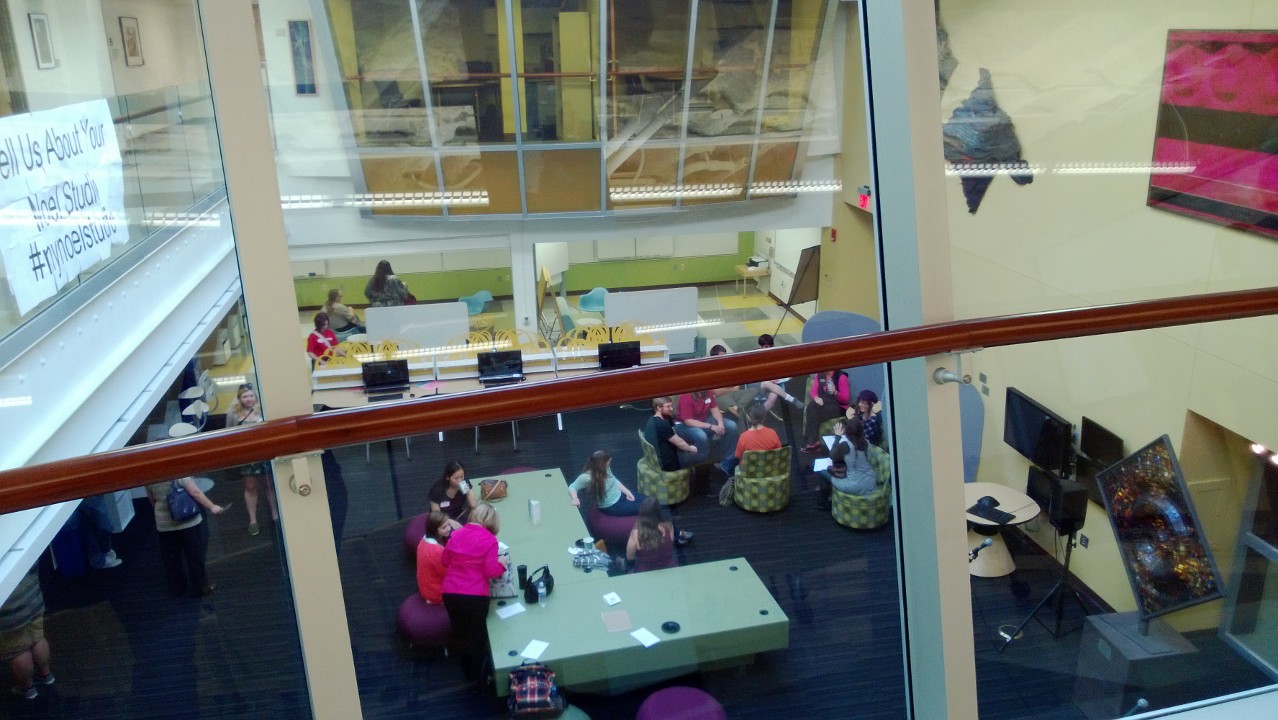
The Noel Studio at Eastern Kentucky University does.  This was the site of the SWCA-KY Statewide Fall 2013 conference, which I attended on Friday September 20th along with the rest of the U of L Writing Center delegation.  Fitting that we should spend our day in a space that brings that aforementioned question to life, because broad questions of what a writing center looks like—in terms of space, technology, methodology, and campus finance—were on everyone’s minds.

The view from above Noel Studio at EKU

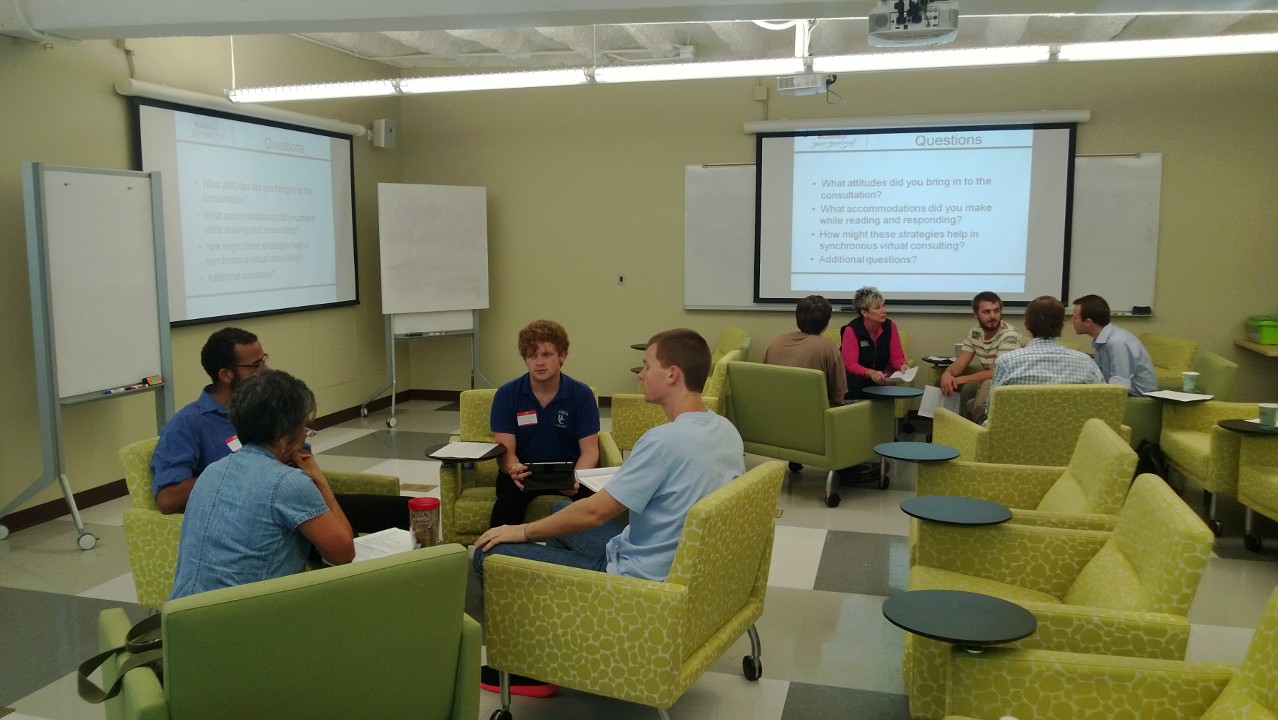
Our ADs Adam, Ashly, Jennifer, and Jessica delivered a presentation on the U of L Virtual Writing Center, which serves students and faculty via email consultation or video chat.  The description of our online pedagogy was not new to me, but it was really cool to hear staff from other centers weigh in.  We discussed the challenge of identifying and addressing each writer’s needs without seeing a face or hearing a voice. (You can read more about our VWC here.)

Participants discussing approaches to virtual consulting
Discussing approaches to virtual consulting

In another session I attended, we discussed research questions on topics such as why students visit writing centers, how to increase visitor numbers, and how to best measure writing centers’ success.  I spoke to one man who was part of team in the process of developing a writing center at Hazard Community and Technical College in Jackson, Kentucky; we discussed how a writing center can best serve the needs of students from disadvantaged economic backgrounds who are interested in trade-programs, nursing, and technical writing.  The conference administrators encouraged all of us to develop our research ideas and submit abstracts for the SWCA regional conference in February 2014.

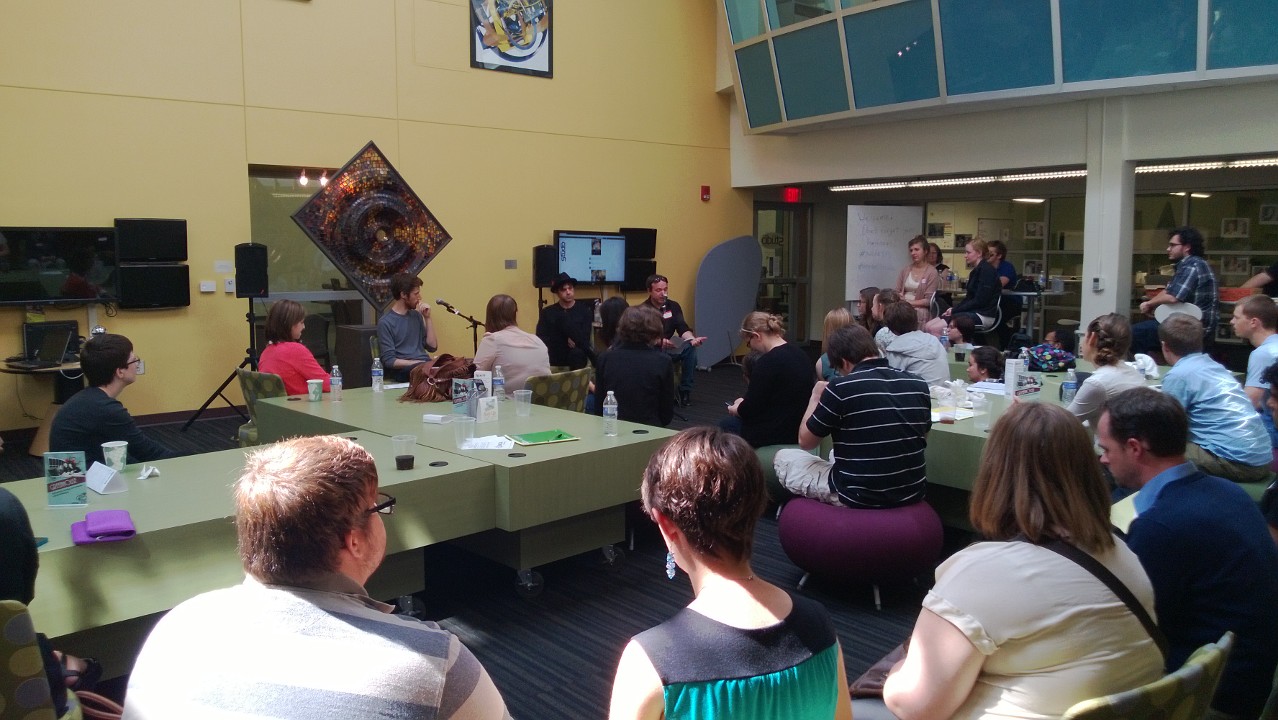
The conference’s keynote was a conversation with Kentucky singer/songwriter Daniel Martin Moore and EKU-alum/producer Duane Lundy, who discussed the collaborative aspect of creativity.  Along with a few songs, Moore shared his thoughts on what makes for the best time and space for writing.  If you’re in a hotel room in Costa Rica and the muse descends, Moore said, it’s time to clear your schedule and focus.  Lundy, on the other hand, described the importance of creating a safe environment for experimentation and creativity while making records at his studio, Shangri-La.  The two agreed that sometimes it’s best to take hold of whatever creative spark the situation offers, and sometimes it’s best to engineer the space and atmosphere to your advantage.  They also discussed how technology has made the process of creating music much easier—that could mean smart phone recording apps, pitch-shifting programs, and even moveable walls.  Drawing parallels between collaboration in the music studio and collaboration in the writing studio, Moore and Lundy emphasized that all creativity has its genesis in the bridges that art builds between people from different times, communities, and experiences.

SWCA-KY '13 Keynote Presentation
SWCA-KY ’13 Keynote Presentation

In sum, I found that writing centers all over Kentucky are asking the same question—what should a writing center look like?  How does technology fit in?  How can we ensure our place in the university’s budget?  How do we meet the needs of students from all economic backgrounds?  And, perhaps most importantly, how do we change the perception of a writing center from fix-it-shop to build-it-studio?  At EKU, it looks like comfy chairs and bright colors.  At U of L, it looks like iPads and an increasing online presence.  What does it look like at your writing center?

Join the Fight; Become a Writer

Ashly Bender, Assistant Director

Ashly_Version_3By 2013, the Order of Words—of letters even—could no longer hide the fractures running through its structure. Some words remained strong by latching on to other words to create powerful cultural phrases. Other words adopted new meanings, or they went under penknife for to add or remove letters. Some particularly unfortunate words just fade and disappear; their ghosts haunting old pages and high school students.

In the beginning, the deteriorating words were blamed on the infamous kids-these-days and new-technology. Well intentioned figures like Twitter and Facebook were turned into evil villains. They were accused of stealing letters, breaking down the cornerstones of complete sentences, and misusing punctuation! Evidence of their positive effects on word-smithing was covered up or ignored.

While language academies and even some teachers fought to hold onto the old Order, other recognized the vitality possible in the changing letters and words. Many knew that some words had been lurking in the shadows of the order and hoped these words would add a new texture to the tapestry of available communication. Leading this fight was the Caped Word Smith. No, not the caped Will Smith—Word Smith.

The mission of our loquacious hero was to forge new paths for young words who were just trying to make a name for themselves and to protect them on their journeys from the dreaded Grammar Meanies. Word Smith would traverse the many interconnected strands of the World Wide Web standing up to grammar bullies, but always trying to show them the way to acceptance and better understanding. She even appeared in the printed worlds of Newspapers and Books. On the most anticipated occasions, Word Smith visited students in their classrooms to share with them the possibilities of Words, Letters, and Punctuation—spreading love and appreciation in all their young hearts.

Of course, not all young words always behaved responsibly—sometimes staying out too late or hanging around with the wrong letters or words. With an eye to the future, Word Smith would encourage them to look inside themselves to find their true path forward. She would challenge them to think about the places and times in which they could be most effective. Did they really belong in this status post, or did they aspire to the offices of textual bureaucracy? She helped them see and seek their dreams.

Perhaps the most inspiring thing Word Smith did for the world though was the creation of the WordCorps. The Writers of the WordCorps were just everyday people who knew the power of Words but also that Words should not be boxed in and controlled. They worked to spread the respect for Words and their ability to change over time. Writers were encouraged to choose their own genres and locations for sharing the WordCorps message. Some worked with those old vilified figures—Twitter, Facebook, and Texting—to rebuild the world’s understanding of how new platforms can inspire growth as opposed to destruction. Others wrote longer texts that they shared with their classmates, coworkers, and friends—always aiming to use Words in new and effective ways. Adventurous Writers even took words into videos and other formats to give them a new kind of movement.

While the WordCorps makes good progress, they always need more Writers to spread the message. It is the dream of Word Smith and the WordCorps to enlist everyone into their organization so that all Words can reach their full potential without fear of bullies or meanies. Will you fight with the Caped Word Smith? Take up your keyboard, your pen, your pencil, whatever you need—and fight the good fight for the Words and Letters and Punctuations! Will you join us, will you be a Writer?

The Places We Write: An Unfinished List

Ashly Bender, Assistant Director

Ashly_Version_3Last week, BookRiot—one of my favorite blogs for literary discussions—posted about the places people read: under a tree, at the beach, in a coffee shop, you know the places. For each place, author Jonathan Streeter rated the aesthetic appeal. For example, reading under a tree is highly aesthetic given its “classic appeal” and prominence in paintings, books, and other forms of art. (Reading “on the throne” was least aesthetic, for obvious reasons.)

Streeter’s blog post got me thinking about the places we write. Much like reading, the cultural conventions around writers and how to write are strong. For centuries, the idea of the writer conjured up images of solitary, often disagreeable, and socially inept individuals (arguably, usually men). Even now, these characteristics often persist. We see it in movies like Shakespeare in Love, where the inspired William Shakespeare runs to his small cluttered apartment to scribble down lines of his upcoming play, or in Stranger than Fiction, where Emma Thompson’s character is portrayed as difficult to get along with. On-screen or in-book writers who frequent coffee shops are just as likely to be seen as solitary. Bronwyn Williams and Amy Zenger offer more critical and thorough insight on this in their book Popular Culture and Representations of Literacy.

Given that this view of writers persists, despite repeated evidence that when we write our content most often comes from interactions with other texts and other people, I want to consider today the places we actually write.

Dorm/Home: Most people who are expecting to be doing consistent writing or studying have a space in their home to work. For many students that place probably their desk in their dorm room. Others who aren’t living in dorms might have an office in their house, or just a desk. Personally, most of the writing I do at home I do in my kitchen because my table is big enough to spread out any books or notes I want to look at while I write. Plus, the food is right there.

Cafes and Bookstores: It makes sense to begin here since I’m currently sitting in a Barnes and Noble Café. While plenty of the other customers are reading, there are at least three other people writing in some form, and based on observation over time, I’d say this is not unusual. I generally prefer coffee shops, but the town I’m in is small and doesn’t have a café that accommodates hours-long customers. The upside to coffee and book shops is that those of us who need to “get out of the house” are able to be productive while still seemingly engaging with the outside world. Plus, there’s always people watching or small talk if you get stuck or need a break.

Libraries: Libraries have always had a particular atmosphere for me: quiet, studious, quiet. You may be getting a sense of why I prefer the coffee shop, but many people love the sense of focus and the lack of distraction that libraries can offer. Plus, many students living on-campus can make temporary homes and offices in the libraries at their universities. In fact, the University of Louisville’s Ekstrom Library is currently renovating to offer more of these spaces. The benefit of being in library, of course, is that if you need to look up a book or an article, you’re already there! I love wandering through the stacks. And, Ekstrom Library also houses the University Writing Center, so if you have any writing questions or want to walk-in for an appointment you don’t have to go to another building—just to the 3rd floor.

Writing Centers: Speaking of the Writing Center… Of course, most of our work is helping students with their writing in consulting appointments, but we also have computers and tables where people can just come in and write. This was one of the important benefits of our Dissertation Writing Retreat, every morning participants had at least four hours to just write before meeting with a consultant.

This list is certainly preliminary and subject to my own experiences. Where else do you write? Where is your favorite place to write? I’ve been known to write on my porch, on an airplane, and even in my car—though not while driving! If you aren’t bound by place, what things do you need to write? Let us know in the comments!

Taking a Moment to Revel in Spring Success

Ashly Bender, Assistant Director

Ashly_Version_3It’s the last day of Spring 2013. We’ve made it! Well, in few hours we will have made it. If you’re like me, you’re already planning and getting anxious about what summer holds, thinking about how you’re going to balance play and work. As enticing as summer can be and as much as we may be anxious to move forward, the end of the semester is a good time to realize what we’ve accomplished in the past four months. Like many of the clients we see, the Writing Center staff have seen their hard work pay off this semester. We’ve seen our numbers rise across the board, we’ve enriched our outreach, and we’ve broadened the ways in which we can help people during sessions.

The Writing Center uses two main measurements to gather insight into our activity for the semester. First, after each session, clients receive a survey that aims to highlight what was helpful or not about the appointment, as well as giving their overall sense of the effectiveness of the Writing Center. We also calculate the number of appointments and clients we see each semester. The numbers this Spring are very positive. We haven’t calculated official counts for the combined Belknap campus, Health Sciences campus, and Virtual Writing Center, but just on the Belknap campus we have seen 770 students for approximately 1750 different appointments.  In addition, the Virtual Writing Center has been nearly full all semester, so we’re expecting even more impressive numbers. Further, our second Dissertation Writing Retreat—which we are very excited to offer again this year—had more than double the applicants as last year.

Our social media outreach has also broadened this semester. The number of visitors to our blog (thank you, readers!) has steadily grown—reaching over 500 in February and April. Similarly, our Facebook page has been active and well-received. Each of our posts are seen by about 50 people, sometimes reaching into the hundreds. Our Twitter, which we started this semester, has also been successful. We are very grateful for the support we’ve had in these spaces and look forward to growing success.

While I am especially proud of the social media numbers (that’s my project), perhaps one of the most exciting things we’ve done this semester is pushed ourselves to incorporate some non-traditional tools to help us and writers in appointments. Namely, the Writing Center purchased and began using iPads in some of our consultations, depending on their usefulness for the particular session. While we’ve written about our new iPads before, it has been exciting to have apps and web support at our finger tips rather than sitting at a large distracting computer or flipping through dictionary pages to find the spelling or precise meaning of a word. (Although, I’ll admit I advocate for the page-turning method myself.)

As we close our doors today on Spring 2013, these are just a handful of the successes the Writing Center has seen as a whole. In addition to these, our consultants have earned individual successes over the year, including completing their first year of the English Master’s program. We’re proud and grateful to have had them here for a little while, and we wish them luck (which they certainly don’t need) as they begin teaching in the Fall.

And, dear readers and clients, never fear—we return May 13th for Summer 2013! See you then.

iPads in the Writing Center

Sam Bowles, Consultant

Just recently our Writing Center added to its technological arsenal a collection of iPads available for consultants to use with clients during sessions.  As technology has always been an area of extreme interest for me, I actually piloted the use of an iPad during consultations last semester.  Here are some of the key areas where I think iPads (or any tablets for that matter) have a lot to offer the kind of work we do in the Writing Center.

Planning

We help writers at all stages of the process, including the brainstorming or planning stage.  The iOS platform has a litany of apps that can be helpful for getting started with writing projects.  One that I like, IdeaSketch, allows users to create concept maps or flow charts and then convert those into a hierarchical outline.  The process can also work in reverse, creating a traditional outline and then converting it to a mind map, both of which can be continually manipulated, moving items around with ease.  IdeaSketch also has a nice iPhone app, so the file created during a session can be emailed to a student with a compatible device, or a PDF can be printed or emailed if needed.

SamReviewing

Tablets can also be a great way to workshop drafts.  Using a program like Notability, users can not only annotate a document in ways that mimic working with an analog document, but additionally, one can zoom in particular parts of the paper, allowing the consultant and client alike to focus on an isolated issued.   Once the session is completed, the annotated document can easily be emailed to or printed for the client.


Sharing

Finally, the iPad adds a lot to sessions because it puts access to endless resources at your fingertips.  I regularly use the iPad in session to help clients look of terms, review citation information from websites like the Purdue OWL, or even search our library’s databases for articles.  Sure, this could be done on a computer, but with an iPad the session doesn’t have to be interrupted by the move to a computer station.  And the iPad is physically closer to a printed document that can be passed back and forth and set aside quickly, unlike a computer monitor and corresponding peripherals.   Additionally, as with almost all the resources iPads have to offer, links to websites, handouts, and other resources can be quickly and easily emailed to the student.

Modeling

iPads can add a lot to Writing Center consultations, making much of what we do already more convenient and accessible, but another reason to use such mobile devices in sessions is to demonstrate for clients how they could be using the mobile technology many of them already have to serve them in their academic work.

Students are using their phones and tablets to perform web searches already; why not show them ways they can use their devices to perform more academically relevant queries?  They are using apps to find out what time a movie starts on Saturday; why not show them some apps that will help them find and understand a given term and its synonyms?  They are using their phones and tablets to organize their lives already; why not show them the ways they can use their devices to organize their thoughts and ideas for upcoming projects?  Could we grab a physical dictionary just to make a point? Sure.  But by showing students good, reputable and often free mobile dictionary apps as well as the host of other uses and applications available on mobile platforms, we are demonstrating for them skills they can use on their own outside of the library or Writing Center with devices they always have available.

Google Docs

Ashly Bender

Tech-geeks can sometimes get a little over-excited about using “cool new technologies.” When it comes to new media writing technologies, I also sometimes have this response: “Look how cool it is! Let’s use it in class!” Most of us who have had to use a wiki or Google docs or some other online writing collaboration tool find that the classroom can be much better at pointing out the kinks in a program than highlighting the usefulness of it. Recently though, I used Google Docs with a classmate to write a six-page essay critiquing an academic article. We wrote the whole paper in an hour, and we were amazed at how quick and productive the whole process was. It was a kind of writing high—something that a lot of people, even English majors, don’t always experience when they’re writing. As we talked about the Google Docs experience, though, it became clear that some of the success of our one-hour writing sprint had to do with the technology, but some of it just had to do with the way we had prepared.

The technology itself allowed us to write with each other at the same time in the same document. It helped that we were also sitting next to each other at the coffee shop, but really we spent more time typing than talking. She pasted in an introduction from a handout we had made previously, and I expanded it out while she wrote the next two paragraphs. Then as she wrote the conclusion, I was able to add in the rest of the body paragraphs. In between, we revised each other’s paragraphs so that the paragraphs would flow together. It just seemed to be a writing groove that Google Docs enabled precisely because we were working on a single document at the same time—writing with and over each other.

The catch, though, is that we didn’t start writing completely unprepared. Before we wrote this paper, we had presented the same content to our class. We also created a handout for that presentation. It took us approximately 4 hours (all together) to prepare all the material. Our Google Docs paper was essentially the flushed out version of the handout we created. So even though it seemed to only take us an hour to write this paper, really it was the final product of 5 to 6 hours work.

Still, Google Docs is awesome. You should use it. In class if you can.